Practical Guide to Running a Company with Claude Code: A Complete Explanation of Automation and Efficiency
- 2026/03/30 10:18

**Practical Guide to Running a Company with Claude Code:
A Complete Explanation of Automation and Efficiency**
This document is a learning guide on how to use Claude Code not just as a chat tool, but as an autonomous AI employee—a system that enables individuals or small teams to run an entire business efficiently.
1. Short-Answer Quiz (10 Questions)
Question 1: What is the key difference between traditional chat-based AIs (such as ChatGPT or Google Gemini) and Claude Code?
Question 2: Why is Visual Studio Code (VS Code) recommended over Cursor as the working environment for Claude Code?
Question 3: When structuring an AI company organization, what kinds of information should be stored in the initial “Context (Knowledge)” folder?
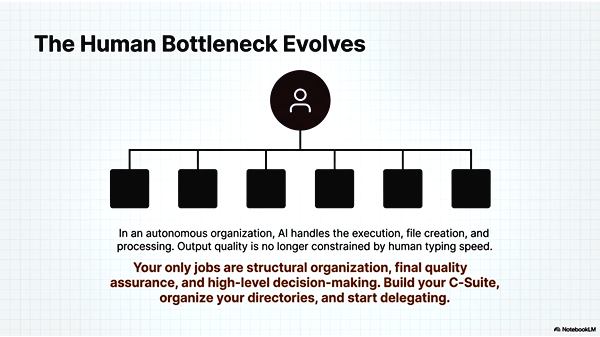
Question 4: Briefly explain the roles of the five key positions (CMO, CPO, CFO, CSO, CDO) proposed in the organizational model.
Question 5: When creating the “claude.md” file that defines the project’s overall rules, what word-count limitation should be observed, and why?
Question 6: How should “folder-specific rules” be used in relation to the global/common rules?
Question 7: What is the “Skills” feature in Claude Code?
Question 8: What are the benefits of splitting the terminal screen to run multiple Claude Code instances simultaneously for higher productivity?
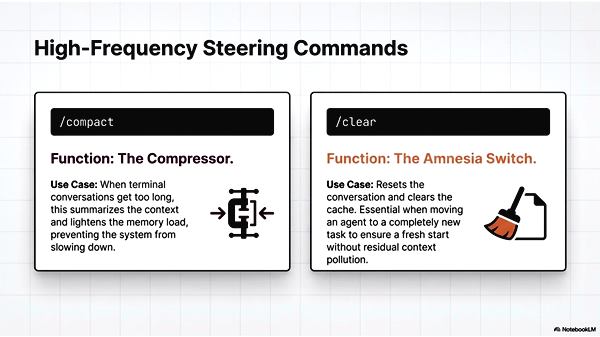
Question 9: Explain the functions of the two daily commands “/compact” and “/clear.”
Question 10: How should the “Sonnet,” “Opus,” and “Haiku” models be used optimally according to task type?
2. Answer Explanations
Answer 1:
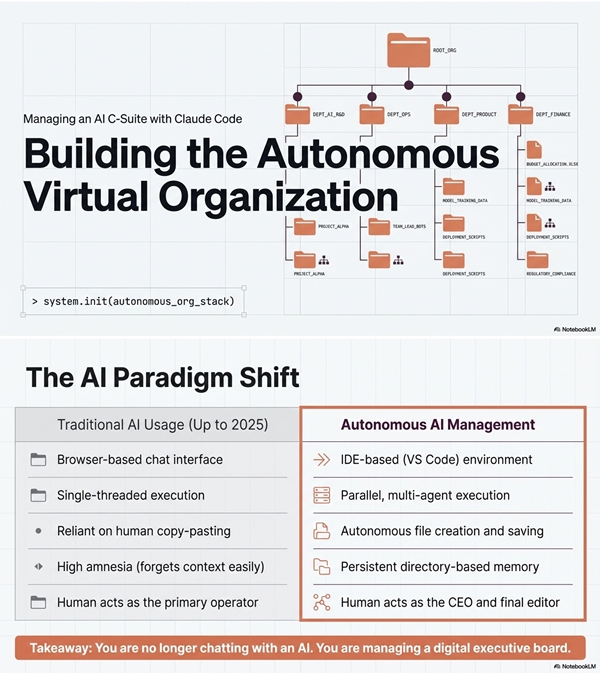
Traditional AI systems mainly serve as chat or consulting partners, requiring users to copy and paste or manually manage outputs. In contrast, Claude Code acts as an AI agent that autonomously executes tasks—from research and document structuring to editing, file creation, and saving—based solely on instructions.
Answer 2:
While Claude Code can run in Cursor, VS Code is recommended because it performs more smoothly. Cursor tends to slow down as workload increases, whereas VS Code offers a lighter and faster user experience.
Answer 3:
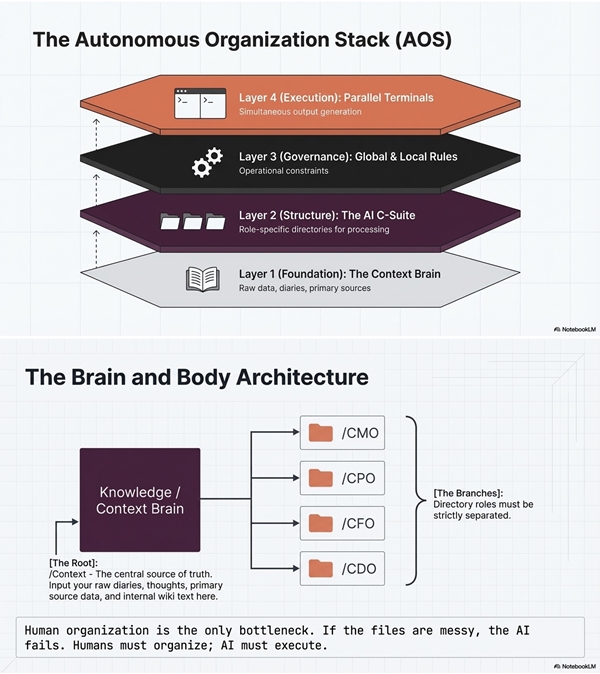
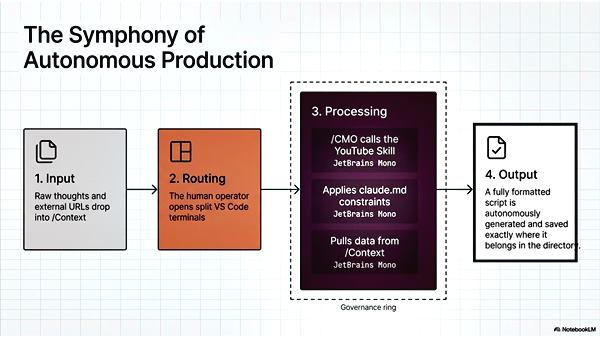
Store all input data such as personal thought processes, study notes, daily journals, internal company information, and primary sources in text format. The more knowledge accumulated here, the higher the precision and expertise of the AI “employees” (assigned to each role).
Answer 4:
-
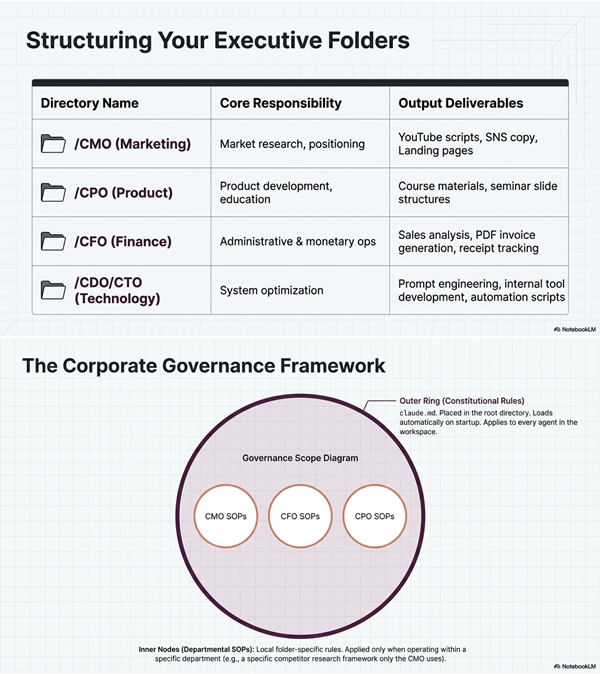
CMO (Chief Marketing Officer): Marketing strategy and outreach
-
CPO (Chief Product Officer): Product development and planning
-
CFO (Chief Financial Officer): Finance and administration, including invoicing
-
CSO (Chief Sales Officer): Sales and customer relations
-
CDO (Chief Digital Officer): Technical management and prompt optimization
Organizing these roles as separate directories clarifies responsibilities and prevents confusion in data management.
Answer 5:
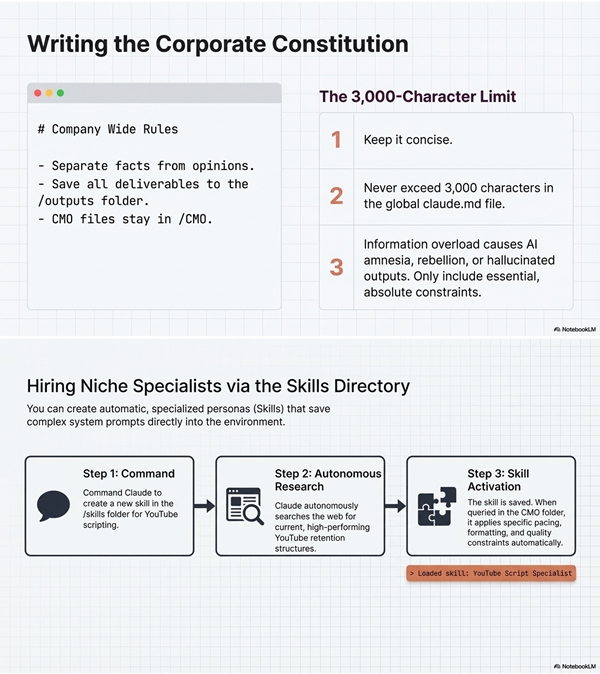
Each rules file should be limited to 2,000–3,000 characters. If too lengthy, the AI struggles to determine which rules to prioritize, risking instruction conflicts or unintended behavior.
Answer 6:
Write project-wide shared rules in claude.md, while detailed, department-specific guidelines go into folder-specific rule files. Because folder-specific rules apply only within a limited scope, they can include longer and more detailed instructions than the common file.
Answer 7:
The “Skills” feature embeds specialized expertise or workflows into the AI. For example, you can register a skill like “YouTube Script Specialist” so the AI consistently produces expert-level outputs without re-entering prompts each time.
Answer 8:
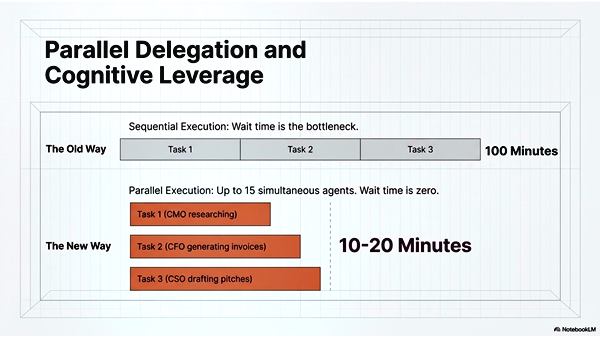
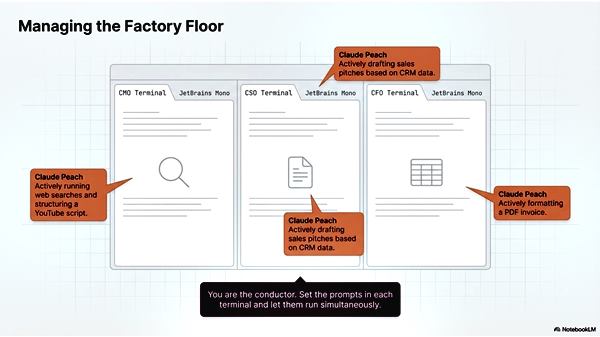
Running multiple Claude Code instances (AI employees) in parallel for different tasks—such as marketing, sales, and accounting—eliminates waiting time for the human user. Handling up to about 15 concurrent tasks can reduce total work time to less than half.
Answer 9:
-
/compact: Summarizes lengthy conversation history to reduce system load.
-
/clear: Resets the session’s context, clearing cached data to prepare for a new task.
Answer 10:
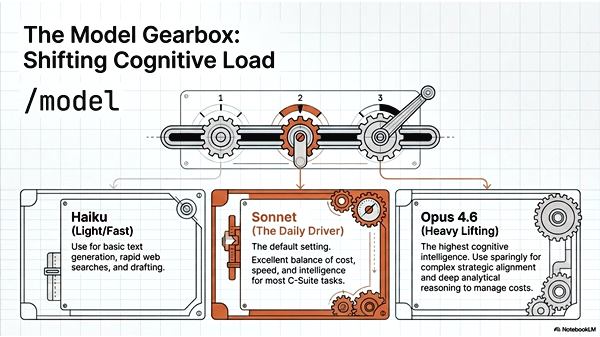
Generally, use Sonnet for standard operations. Use Opus 3.6 for highly complex reasoning tasks, and Haiku for quick responses, simple writing, or organizing research outputs—balancing cost and performance.
3. Essay Topics
Write a short essay discussing the questions below, using examples or ideas from the source material. (No sample answers provided.)
-
“Humans Should Focus on Organization”:
Discuss the importance of design and decision-making in an age when AI can outperform humans at execution tasks. -
AI Management Through Directory Structure:
Explain how maintaining clearly structured role-based folders, rather than disorganized file storage, helps eliminate bottlenecks in AI-driven management. -
Autonomous AI Agents and Organizational Change:
Consider how the evolution from passive “instruction-following AIs” to autonomous tools like Claude Code impacts side businesses and company operations. -
Strategic Rule Design:
Explain how the three-tiered approach—common rules (claude.md), individual rules, and skills—improves controllability and strategic execution by AI. -
Time Creation Through Parallel Processes:
Discuss how operating 15 AI employees simultaneously transforms the traditional “one task at a time” workflow.
4. Key Terms Glossary
| Term | Definition / Explanation |
|---|
| Term | Definition / Explanation |
|---|---|
| Claude Code | A self-operating AI agent tool developed by Anthropic. |
| AI Agent | An AI that autonomously completes research, writing, and file tasks once instructed. |
| VS Code | Microsoft’s lightweight code editor, recommended as the optimal environment for Claude Code. |
| claude.md | The root configuration file that stores shared rules and system-wide instructions for the AI. |
| Directory Structure | Folder organization by role (CMO, CFO, etc.) to prevent confusion and simplify management. |
| Multi-Agent | A method of running multiple AI “agents” in parallel, each handling a different role. |
| Skills | Registered expertise profiles that let AI perform specialized tasks (e.g., “YouTube Script Creator”). |
| /compact | A command that summarizes conversation history to streamline performance. |
| /clear | Resets the AI’s internal context for a fresh start on a new task. |
| /model | Switches between AI models (Sonnet, Opus, Haiku) based on task requirements. |
| Context | The background knowledge base (journal entries, source data, etc.) used for reasoning. |
| PDCA | The business cycle of Plan → Do → Check → Act applied to managing AI workflows. |